Here are tasks that was added to TODO page and has been done or ignored.
Contents:
DONE
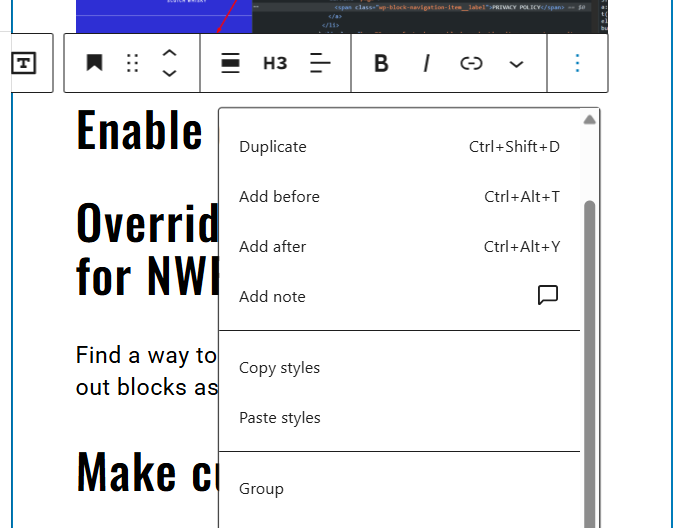
Enable comments route,
to Add note functionality works correctly
Rename all blocks css params (props) [P1] [DONE]
add css_ prefix to all blocks params that related to css variables.
Use another lib for images Lazy-Load [P2]
https://atlassian-bacardi.atlassian.net/browse/DXP-2503
- Remove current lazysizes script (leave as legasy for v3 v4)
- Use lazy-load for images, video, ifarame, bg-images, slider init etc…
- Use https://developer.mozilla.org/en-US/docs/Web/API/Intersection_Observer_API try to find simple but powerful lib for lazy-loading that use this API.
This block will be a simple wrapper for formated text when we need write text like here: https://www.bacardi.com/culture/mojito-moments/
Text with headings, paragraph etc. when we need margins for text.
Add block: simple “article-text” [P1] [DONE]
Ticket: https://atlassian-bacardi.atlassian.net/browse/DXP-2502
Disable the “Apply globally” button in block Advanced settings in the block editor [P5] [DONE]
“Apply this block’s typography, spacing, dimensions, and color styles to all Split (nwp) blocks.”
Think through and configure which default blocks should be disabled [P6]
For example, “Media & Text” might be worth keeping because it may be useful. Disabling is done in: platform/wp-content/themes/core-fse/auto-include/allowed-block-types.php
Extract anchor integration from the cover block into a separate block! [P2]
https://github.com/Bacardi/epam_dev_wp-platform/pull/2327
Figure out how to automatically pass variables into props based on variable (attribute) name[P4] [DONE]
For example, if an attribute starts with cssvar_. Find a unified way to add CSS variable settings to blocks. Approach: we add a block attribute --media-width and it automatically appears in the block’s style attributes via get_block_wrapper_attributes() and blockProps in React. If this is not done, there will be a lot of repetitive code across blocks to output these parameters.
Create an “Inline SVG” block [P4]
This block should allow inserting custom SVG code into HTML. It must have many settings. As a reference, take the block from SaveSVG plugin – it adds a similar block but with very limited settings. Remove the SaveSVG plugin block!
SEO Framework [In progress]
Set default settings on plugin first activation. Use hook – check is settings already exists if not specify NWP related settings for the first time. It needed to not configure the plugin each time for the NWP.
Create a Linker (Link wrapper) block [P1][DONE]
https://atlassian-bacardi.atlassian.net/browse/DXP-2419
We need a block that can make any block or group of blocks clickable. Possibly this plugin can be used as a base: https://wordpress.org/plugins/advanced-link-block/
Починить ошибку в консоли “waitForKeyElements” – https://agnostic-fse-com-gl-en.wpe-stg.bacardi.digital/wp-content/plugins/nwp-gutenberg-blocks/blocks/vimeo/block.js этот скрипт требует либу, которой нет…
Other DONE:
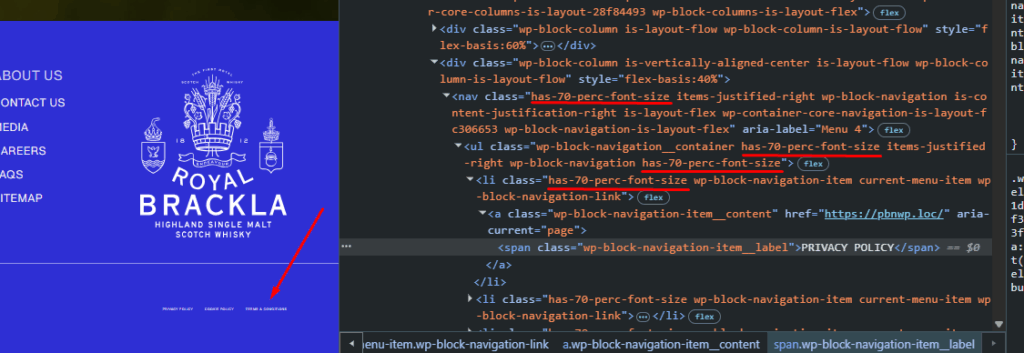
- Fix nav-block font-size percent inheritence [DONE]
![]()
- (DONE) Build
nwp-fse-blocksplugin on deploy stage And remove min (build) files from GIT. [P2] - (DONE) Bring all classes and names in new blocks to a unified style. Classes must not conflict with existing ACF blocks. I propose using the prefix
nblockinstead ofblock- - (DONE) Rewrite the split block using native block code.
- (DONE) Clean up the primitives file – remove unnecessary things, keep only what is needed.
- (DONE) For the cover block, figure out how to set the height through the admin.
- (DONE) For the split block, figure out how to set the image width. If needed, add a setting.
- (DONE) Saved images do not work because of Offload Media. We need to store only the ID and get the URL on the fly both on frontend and backend.
- (DONE) Hide header menu blocks on all templates except the header template, so they do not interfere when editing another template.
- Slider block
- (DONE) Add the ability to set the gap between slides, and add vertical alignment options to slider-item blocks.
- (DONE) Add Swiper options, at minimum the freeMode option.
- (DONE – handled by using variables in values) Bug: cannot select font size edge-x.
- (DONE) Remove the possibility to unlock blocks that were locked.
- (DONE) Removed Vimeo settings entirely from the split block.
- (DONE – irrelevant, not added in the new implementation) Block: Why is Vimeo video inside the split block? Visually it is just shown as fullscreen video, unrelated to split. Also does not work on V4. I created a split block on new Dewars /gl/en, inserted a Vimeo video https://vimeo.com/457907557 and nothing shows. Need to understand the purpose and reason.
- (DONE) Rewrite the gulpfile.js builder for native blocks. The JS bundle size is huge…
- (DONE) Analyze whether we can use core blocks like cover, split: If we can, then use only them; if not, disable them and create our own equivalents.
- (DONE) Move loading of the “player.vimeo.com” script. Register it in advance and enqueue where needed, via block.json. Refactor everywhere it appears.
- (DONE) Create “Inline SVG” block:Take basis from “Safe SVG” plugin (it already creates such a block). Make it better the “Safe SVG” provide. https://atlassian-bacardi.atlassian.net/browse/DXP-2526
- (DONE) Video block: Make default values not saved in data for “css_playInset”, “css_playInset_M” options.
- Перенести подключение скрипта “player.vimeo.com”[DONE] Заранее регать и где нужно включать в очередь, для блоков через block.json. Отрефакторить везде, где он есть в коде.
NO SENSE
Add ability to choose shown image part in Split Block (DONE)
Image crop solution: Hint worth checking: <FocalPointPicker> component, right now we only have adding image for desktop…mobile, without any image customization
Other no sense:
- (NO-SENSE) When creating an existing ACF block separately (a copy for the new version), the question arises how to handle certain functionality in the block (for example, anchor integration). Both the old and new block will simply contain the same code. DRY is broken!
- (NO-SENSE. DONE – just removed this code, need to recheck everything is fine) Remove duplicated styles.
plugins\nwp-gutenberg-blocks\includes\critical-css.phpadds block styles and the block itself adds its own styles when registered via block.json (removed). - (NO-SENSE) Review changes in
core-gutenberg. The theme must not conflict with v5. If the changes are significant, then probably it’s better to create a new parent theme for v5 to avoid touching legacy. Think about this… - (NO-SENSE – we do everything separately) We will need to check all changes of the “nwp-gutenberg-blocks” plugin and separate them somehow so that the V4 platform does not break.
- (NO-SENSE – we do everything separately) We will need to check all changes of the “core-gutenberg” theme and separate them somehow so that the V4 platform does not break.
- (NO-SENSE – we do everything separately) Remove unnecessary things from the base theme settings
themes\core-gutenberg\includes, for examplesocial-links.phpseems unnecessary for FSE. Also there isfooter-bottom-content.php, which will probably be needed for FSE. - (NO-SENSE – we do everything separately) Check and configure theme.json in the core-gutenberg theme. Because “If the child theme has a theme.json, WordPress merges both files: the child overrides matching values, and everything else is inherited from the parent.”
- (NO-SENSE – we do everything separately) Remove “Theme Settings” from “core-gutenberg” or better create a new “core-fse” theme for new sites.
- (NO-SENSE) For v5 we need to disable the “nwp-gutenberg-blocks” plugin. And possibly make a similar replacement instead of it.
- (NO-SENSE) Move
themes\dewars-fse\gutenberg-blocksinto a separate plugin and continue developing blocks there.